Itagüí, Colombia ES EN Facebook Instagram YouTube
Home / Enrollment

Enrollment requirements

Choose your situation and see the complete list of documents. You can download all the forms from the downloads section.

Admissions

Enrolling is simple

Three steps, and it all starts with a conversation. If you have questions at any point, write to us and we will walk you through it.

1
Schedule your interview

Come meet us, tell us whether you are interested in the on-campus or Homeschool program, and ask us anything. Book your spot here →

2
Gather your documents

If the interview goes well, check the list for the on-campus or Homeschool program.

3
Complete your enrollment

Submit your paperwork to the front office through the required channels and sign the enrollment contract to join our school.

Learn more
Step by step

Which situation is yours?

Pick your situation: new or returning student, on-campus or Homeschool.

New students

New students — On-campus program

All documents must be submitted in full. Only students with complete paperwork will be officially enrolled.

  • Admission form, fully completed and signed (available in the downloads section).
  • Recent original birth certificate (only for students under age 8).
  • Health insurance (EPS) affiliation certificate or card.
  • Copy of the student's ID document (from second grade or age 8 onward).
  • Copy of the national ID of parents or guardians.
  • Three (3) passport-style photos, 3×4 cm.
  • Read and correctly fill out the enrollment contract (downloads section).
  • Read, fill out, and sign the promissory note and letter of instructions, notarized (downloads section).
  • Fill out and sign the acceptance of the school's student handbook.
  • Employment letter, or income certificate issued by an accountant if self-employed.
  • Grade transcripts for the last three completed grades, on official letterhead.
  • Withdrawal certificate from SIMAT (the Colombian national enrollment system).
  • Student record with behavior and academic history.
  • Certificate of no outstanding debts from the previous school.
  • Be up to date with any pending make-up coursework at the time of enrollment.
New students

New students — Homeschool program

The whole process is done online. Gather the documents from the four sections below and send them in a single email.

How do I submit the documents?

All documents are completed and submitted digitally, in a single email to secretaria@cads.edu.co, with the subject line MATRÍCULA 2027 – STUDENT NAME – GRADE. We recommend sending them as legible PDF files.

The only documents sent by mail are the promissory note and its letter of instructions; even so, the shipping receipt must be included in that same email (see the box in section 3).

1. Student documents

  • Admission form, completed and signed (available in the downloads section).
  • Recent birth certificate (only for students under age 8).
  • Student's ID document (from second grade or age 8 onward).
  • Health insurance (EPS) affiliation certificate or card.
  • Grade transcripts for the last three completed grades, on the previous school's official letterhead.
  • Withdrawal certificate from SIMAT (the Colombian national enrollment system).
  • Student record with behavior and academic history.
  • Certificate of no outstanding debts from the previous school.
  • Be up to date with any pending make-up coursework at the time of enrollment.

2. Parent or guardian documents

  • ID document of the parents or guardians.
  • Employment letter, or an income certificate issued by an accountant if self-employed.

3. Enrollment documents

  • Enrollment contract, read, completed, and signed (available in the downloads section).
  • Student handbook acceptance form, completed and signed.
  • Promissory note and letter of instructions, completed, signed, and notarized (available in the downloads section). These are the only documents sent by mail (see the box below).
  • Financial information of the person responsible for payments, for electronic invoicing, following the circular “Financial information and electronic invoicing 2027” (available in the downloads section).

Mailing the promissory note and letter of instructions

Because they are legal documents, the promissory note and letter of instructions must be sent as originals, signed and notarized, to the following address so the school can verify them:

Colegio Adventista del Sur – Tesorería · Carrera 52 N.° 39A-25, barrio San Isidro, Itagüí, Antioquia

Once they are shipped, the parent or guardian must report the shipping receipt: email secretaria@cads.edu.co a photo or copy of the receipt, including the tracking number, the courier company, the student's full name, and the grade. We recommend replying in the same thread as the documents email, to keep the full history together.

Copies, photos, or scans are not accepted in place of the original promissory note and letter of instructions. Enrollment becomes final only once the school receives and verifies these original documents.

4. Enrollment payment

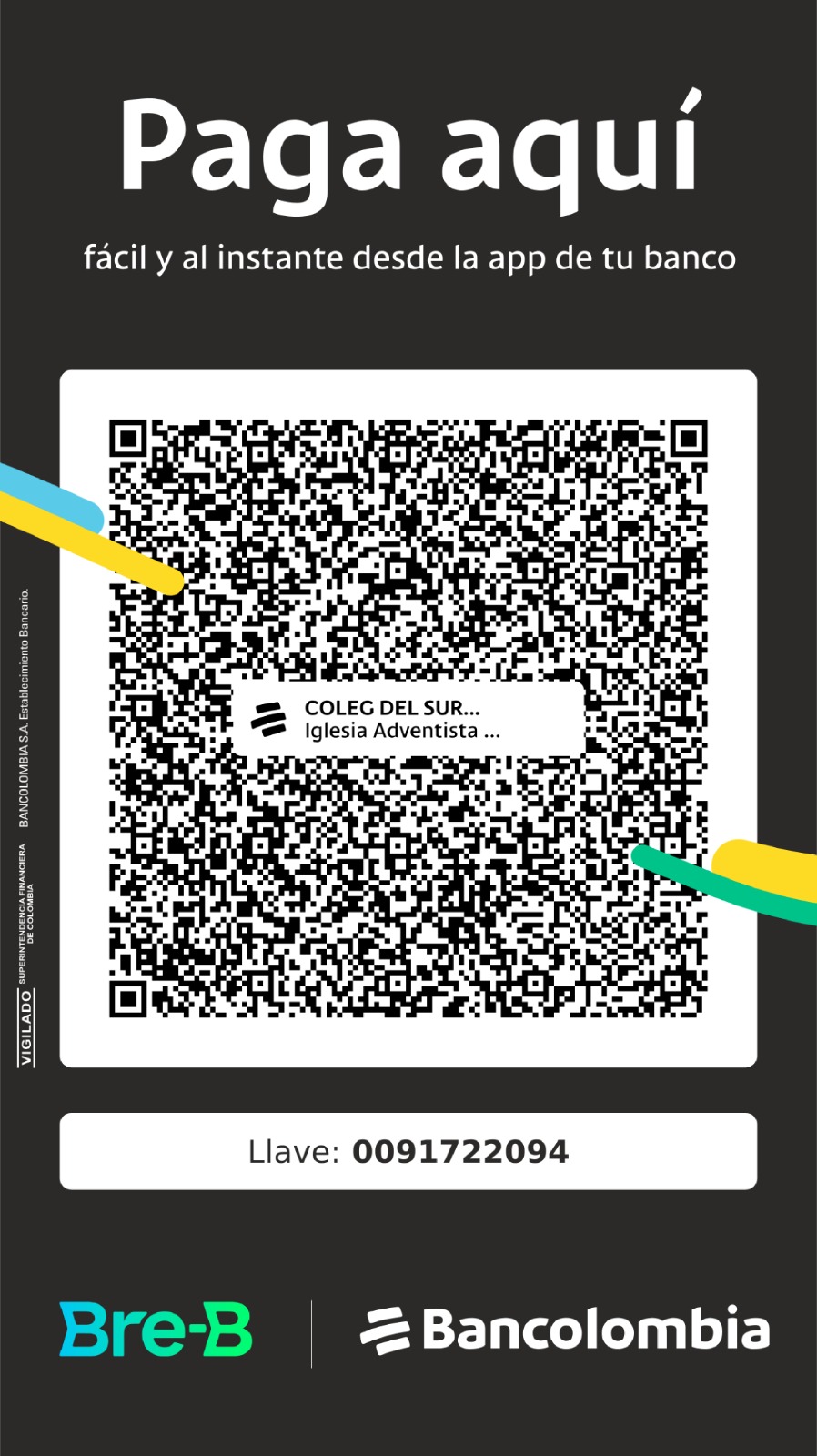
QR code, Bre-B key, or bank transfer

You can pay using any of these three options.
BankBancolombia
Savings account274 770 490 31
Bre-B key0091722094
NIT (tax ID)900.826.341
Account holderA.S.O. Iglesia Adventista del Séptimo Día

Scan it from your banking app

  • Send proof of payment for the annual fees together with the documents to secretaria@cads.edu.co, copying tesoreria@cads.edu.co, stating the student's name, grade, program, and what the payment covers.
  • Once enrollment is complete, proof of monthly tuition payments goes only to tesoreria@cads.edu.co, as described in the circular “Financial information and electronic invoicing 2027”.
  • Proof of payment is not accepted via WhatsApp.
  • Parents or guardians should keep a copy of the proof of payment.

What happens next? The front office will review the documents and the payment of the annual fees listed in the tuition circular. If everything is in order, the front office will complete the student's enrollment and confirm it by replying to the same email. Only students with complete documents and annual fees paid will be officially enrolled.

Returning students

Returning students — On-campus program

All documents must be submitted in full. Only students with complete paperwork will be officially enrolled.

  • Admission form, fully completed and signed (available in the downloads section).
  • Recent original birth certificate (only for students under age 8).
  • Health insurance (EPS) affiliation certificate or card.
  • Copy of the student's ID document (from second grade or age 8 onward).
  • Copy of the national ID of parents or guardians.
  • Three (3) passport-style photos, 3×4 cm.
  • Read and correctly fill out the enrollment contract (downloads section).
  • Read, fill out, and sign the promissory note and letter of instructions, notarized (downloads section).
  • Fill out and sign the acceptance of the school's student handbook.
  • Employment letter, or income certificate issued by an accountant if self-employed.
  • Be fully cleared of any outstanding balances with the school.
  • Final report card from the previous year.
  • Be up to date with any pending make-up coursework at the time of enrollment.
Returning students

Returning students — Homeschool program

The whole process is done online. Gather the documents from the four sections below and send them in a single email.

How do I submit the documents?

All documents are completed and submitted digitally, in a single email to secretaria@cads.edu.co, with the subject line MATRÍCULA 2027 – STUDENT NAME – GRADE. We recommend sending them as legible PDF files.

The only documents sent by mail are the promissory note and its letter of instructions; even so, the shipping receipt must be included in that same email (see the box in section 3).

1. Student documents

  • Admission form, completed and signed (available in the downloads section).
  • Recent birth certificate (only for students under age 8).
  • Student's ID document (from second grade or age 8 onward).
  • Health insurance (EPS) affiliation certificate or card.
  • Grade transcripts for the last three completed grades, on the previous school's official letterhead.
  • Withdrawal certificate from SIMAT (the Colombian national enrollment system).
  • Student record with behavior and academic history.
  • Certificate of no outstanding debts from the previous school.
  • Be up to date with any pending make-up coursework at the time of enrollment.

2. Parent or guardian documents

  • ID document of the parents or guardians.
  • Employment letter, or an income certificate issued by an accountant if self-employed.

3. Enrollment documents

  • Enrollment contract, read, completed, and signed (available in the downloads section).
  • Student handbook acceptance form, completed and signed.
  • Promissory note and letter of instructions, completed, signed, and notarized (available in the downloads section). These are the only documents sent by mail (see the box below).
  • Financial information of the person responsible for payments, for electronic invoicing, following the circular “Financial information and electronic invoicing 2027” (available in the downloads section).

Mailing the promissory note and letter of instructions

Because they are legal documents, the promissory note and letter of instructions must be sent as originals, signed and notarized, to the following address so the school can verify them:

Colegio Adventista del Sur – Tesorería · Carrera 52 N.° 39A-25, barrio San Isidro, Itagüí, Antioquia

Once they are shipped, the parent or guardian must report the shipping receipt: email secretaria@cads.edu.co a photo or copy of the receipt, including the tracking number, the courier company, the student's full name, and the grade. We recommend replying in the same thread as the documents email, to keep the full history together.

Copies, photos, or scans are not accepted in place of the original promissory note and letter of instructions. Enrollment becomes final only once the school receives and verifies these original documents.

4. Enrollment payment

QR code, Bre-B key, or bank transfer

You can pay using any of these three options.

BankBancolombia
Savings account274 770 490 31
Bre-B key0091722094
NIT (tax ID)900.826.341
Account holderA.S.O. Iglesia Adventista del Séptimo Día

Scan it from your banking app

  • Send proof of payment for the annual fees together with the documents to secretaria@cads.edu.co, copying tesoreria@cads.edu.co, stating the student's name, grade, program, and what the payment covers.
  • Once enrollment is complete, proof of monthly tuition payments goes only to tesoreria@cads.edu.co, as described in the circular “Financial information and electronic invoicing 2027”.
  • Proof of payment is not accepted via WhatsApp.
  • Parents or guardians should keep a copy of the proof of payment.

What happens next? The front office will review the documents and the payment of the annual fees listed in the tuition circular. If everything is in order, the front office will complete the student's enrollment and confirm it by replying to the same email. Only students with complete documents and annual fees paid will be officially enrolled.

Important: all forms (admission form, enrollment contract, promissory note, and letter of instructions) are available in the downloads section.
Enrollment payment

How to make the payment

Bank deposit

Submit the bank deposit slip for the enrollment amount. Guardians should keep a copy of the receipt.

Deposit receipts should be emailed to the treasury office, specifying the student's full name and grade level.

BankBancolombia — Savings Account
Account number274-770490-31
Account holderAsociación Sur Occidental Adventista
Treasury emailtesoreria@cads.edu.co
📂 Download forms Questions? Contact us
Admissions 2027

Get to know us before you decide

Come visit, walk the campus, and ask us anything. No commitment, no paperwork.

It takes two minutes. We reply the same day.
1
You tell us when you are freePick the time of day and the days that work for you.
2
We assign the timeWe find the slot that suits you best.
3
We confirmBy WhatsApp and email, with the exact day and time.